Hey Tim and all the listeners, Allison Sheridan here of the NosillaCast Podcast hosted over on smileonmymac.com. I love how you can organize your snippets into groups, so I have a whole slew of Honda Bob snippets all piled up together so they're easy to find. I have his email address and website both in full html, and even the Honda Motor Company disclaimer in there.
But for reasons that are not entirely clear to me, I also use RapidoWrite. In that tool I really like that I can trigger the snippets with a return - when I type a few characters, like pop for example, a nice grey HUD sort of window comes up showing me what I would get if I hit a return, in that case pop would trigger Podcasting on Podcasting). Instead of automatically filling it in like some others, RapidoWrite gives me the choice every time.
Unfortunately back in January, listener Michele from my show noticed that the makers of RapidoWrite and RapdioSerial, app4mac.com two of my favorite apps had decided that they were no longer going to offer them for free. Now that's any developer's right to do that, but they didn't choose to just put a price tag on them, they bundled them up (with some other Rapido apps) and made them free only if you bought one of their other products, most of which were quite expensive. That was a big drag, and I was pretty harsh on them.
So this week Tim asked me to review a new entrant into the snippet market - it's called Presto. I followed the link to the web site, and guess who makes Presto? App4Mac! How cool is that? I'm so happy - they've come out with Presto for a grand total of 9euro which is a little under twelve bucks. Well within the threshold of how fun RapidoWrite was, let's see what Presto can do that's new!
When I entered my license number I as greeted by a bright red alert saying "remember all releases and upgrades are always free!" so that made me happy. I read on line that if you have RapidoWrite, you can import those shortcuts into Presto. I was unable to find where to do that so I hunted online and found their FAQs at app4mac and it said that Presto would automatically bring in your settings from RapidoWrite. But it didn't. that was a big bummer. I even deleted Presto, including all of the associated plist type files, and reinstalled from scratch just in case I missed something but again it didn't happen.
One big improvement in Presto is that you can create folders for your abbreviations just like in TextExpander. Excellent. You can also exclude applications from your Presto abbreviations or say that an abbreviation only works in this one application. That's definitely useful because sometimes a character string means something else in another application. Great feature.
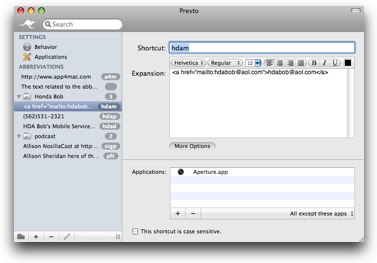 When you enter an abbreviation and tab to the field to type in the long text, it has prepopulated that field with "The text related to the abbreviation". I think if you tab to that field it should pre-select that text so you can just start typing in your text, but instead you have to select that text first. It's a minor nit, but remember our whole task here is to eliminate waste. i think they could do that change pretty easily. They've enhanced the text you can have typed by adding formatting. That's pretty cool! You can do all the usual things, bold, underlined, left, right justify, color changes and even font and size changes. Very cool options.
Now let's talk about how it actually inserts the text for you. let's say I'm typing along in an email and I want to insert my signature. I type the few characters I want to use, and up plops on the screen with that cool OSX effect where it looks like you're dropping into water on the screen. It makes a nice pop sound. Then you hit the down arrow to select the text, hit the return and you hear a ping as the text is plopped into place. This works well, but I think they really need to figure out how to elminate that step of using the down arrow. When you use Quicksilver to launch an app, you can just hit a return if it comes up first, or you use the arrow key if it's not the first choice. I wrote to Patrice from app4mac about this and she said there's a problem with Leopard that makes them have to do this. If I don't have to do the down arrow with Quicksilver, or heck, even with RapidoWrite, then why do I have to do it with Presto? I guess I can get used to it, but if the whole point is to reduce keystrokes, this was actually a backwards step from RapidoWrite.
One feature that didn't work for me was the automatic import of my abbreviations from RapidoWrite. Patrice is trying to help me with this too, so we're investigating plist files and all that. I like the responsiveness I'm getting from App4Mac, that's really what shareware is all about right? We don't expect perfect but we have come to appreciate the rapid response time and the ease of getting to the people who can help you.
I also had trouble with the case sensitive option when I tested it. I typed in NEW in all capital letters, told it to use it case sensitive, but it doesn't trigger Presto into action. I unchecked the case sensitive option, and now it works. I deleted that abbreviation and later I tried it again and this time the case sensitive part did work. Go figure.
Time to bottom line it here - for $12 I think this works pretty well, with an enhanced feature set from RapidoWrite with the formatting options, case sensitivity, and folders to sort out your abbreviations. It's less expensive than TextExpander, but I haven't reviewed the newest version of TextExpander lately so I can't evaluate the differences just yet. Wow, just added to my to-do list now, didn't I Tim? I hope that the App4Mac folks do a little more development to make the importing from RapidoWrite work for everyone and that they figure out how to get rid of that down arrow bit, but for now I think it's a good value for the price.
Take care now Tim, and get healthy so you can go play with that grandson of yours!