Introduction & Installation
This tutorial will provide instructions on how to create an audio recording suitable for a Podcast using the Open Source software Audacity. This is not meant as an in depth tutorial on all of the functions within Audacity, but rather how to set it up so that you can record an audio file and save it in such a way that you can then upload it as a Podcast. All of the screenshots will be taken in Mac OSX, but you should be able to follow along in Linux, Unix, or Windows.
Download Audacity from SourceForge
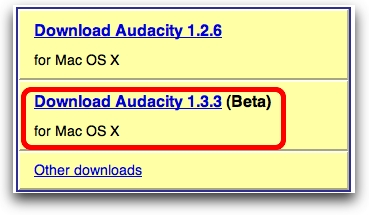
We should start by actually downloading the application from audacity.sourceforge.net. As I mentioned in the introduction, Audacity is Open Source, which means you have a lot of freedom, and the software comes at no cost, but it does come with a license called the GNU Public License. Make sure you respect this software license as you would a commercial license!
On the downloads page you'll notice there's a stable release for Windows, OSX, and LInux/Unix, but there's also a Beta release. Choose the 1.3.3 Beta version - even thought that sounds scary, it's very stable and has been listed as beta for about a year as of this writing in February of 2008! If you're on Windows or Linux, the Downloads will show for your Operating System (the screenshot shows OSX because that's the operating system from which I hit the site. Run the Installer.