Microphones
Microphones
Let's talk just a bit about microphones before we launch audacity. I'm not a big ol' audiophile, so I'm not going to tell you to go out and buy a big rig, but there is one piece of advice I will give you. You must have headphones on when you're recording. If you have a standing microphone, plug in some kind of headphones, even plain old earbuds will work. Alternatively you can get a headset microphone that includes the head phones. If you don't wear headphones, you'll get feedback that will destroy your recording. If you can't afford a microphone at this time, you could even use a built in mic like on a laptop, but no matter what you must use headphones!
1st Mic - Low end headset mic
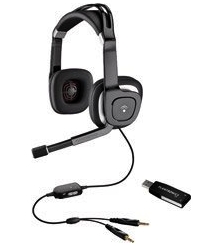
Many people ask what kind of microphone I use to record my Podcast. When i first started podcasting, I used the headset mic I got in the box with IBM's Via Voice recording software. I don't think IBM even sells that model any more. If you're looking for an inexpensive headset mic, the Plantronics Audio 650 USB mic is really comfortable and gives darn good sound for around $30.
2nd Mic - the Samson C01U
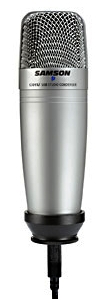
After a few months I upgraded to the Samson C01U which is a USB mic. I knew it was a good one because it has a sticker right on it that says "Ideal for Podcasting"! It gave me a big boost in audio quality and the price was right, it runs $89 at the time of the writing of this tutorial. I bought mine at samash.com. Don't forget to buy a stand, because this mic doesn't come with one. I just bought a generic one for around $15.
3rd Mic - the Heil PR20 with a Mackie DFX-6 Mixer

After a couple more years of podcasting I decided it was time to take it up a notch and i got a Heil PR20 and a Mackie mixer. This setup is designed to give me more control over my recordings, both my voice and the voices of people I interview over Skype. The setup of this rig is way more complicated than the audience for which this tutorial is designed, so for now go with a headset mic or something like the Samson C01U.